
Enhanced Chrome Search & Navigation Tool
Overview
The software is a Chrome-based utility designed to enhance search functionality and navigation within the browser. It addresses common user frustrations such as slow loading times, limited search customization, and inconsistent window closure behavior. The tool provides a streamlined experience for users who frequently switch between tabs, rely on quick access to recent pages, and require efficient search workflows. It is particularly suited for professionals, digital researchers, and power users who depend on consistent and responsive browser interactions across multiple platforms.
Developed with iterative improvements, the application has evolved through multiple versions, focusing on performance, usability, and feature expansion. Each update addresses specific user pain points, including issues with scroll wheel navigation, record retention during browser shutdown, and interface clarity. The developer has prioritized user feedback, introducing customizable settings such as search scope, hotkey remapping, and display toggles. Real-world usage scenarios include rapid access to previously visited pages, efficient keyword highlighting, and seamless navigation without relying on default browser behavior.
Key Features & Capabilities
- Instant Search Functionality – Enables real-time keyword matching as users type, reducing time spent on manual navigation and improving search efficiency.
- Customizable Hotkeys – Allows users to define personal shortcuts for opening the last closed page or triggering search actions, enhancing workflow speed.
- Search Scope and Tooltip Guidance – Provides visual cues when hovering over the search bar, indicating the current search range, improving transparency and control.
- Window Closure and Record Integrity – Ensures browsing history is preserved even when the window is closed directly, preventing data loss during abrupt exits.
- Display and Interface Customization – Offers toggles for logos, sponsor buttons, time display, and top-bar visibility, enabling users to tailor the interface to their preferences.
- Time Precision to Seconds – Records timestamps with second-level accuracy, offering detailed tracking for research or productivity logging.
- Back-to-Top Navigation – Adds a quick scroll button to return to the top of long lists or pages, improving usability during extended browsing sessions.
- Roller Wheel Page Navigation – Supports smooth vertical scrolling through results using the mouse wheel, enhancing navigation fluidity.
These features collectively support a more personalized and efficient browsing workflow. For example, users can set a custom hotkey to reopen the last closed tab instantly, ideal for multitaskers who frequently switch between projects. The ability to customize the search scope ensures that searches remain focused and relevant. Interface toggles allow users to minimize distractions, making the tool suitable for both minimalist and feature-rich environments.
User Interface, Workflow & Performance
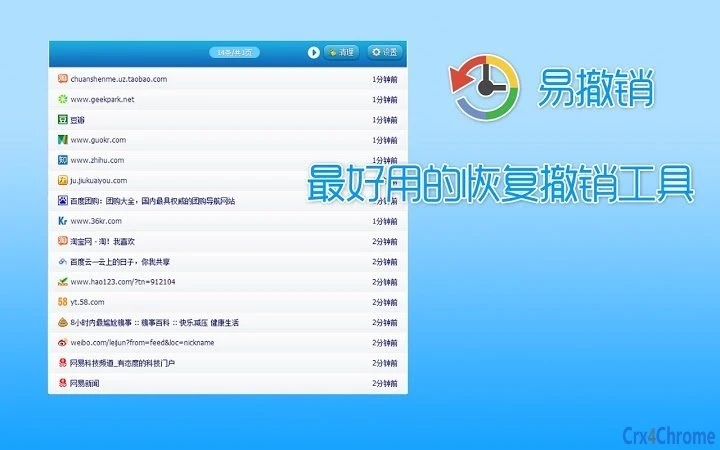
The user interface is designed with simplicity and functionality in mind, featuring a clean layout centered around the search bar with contextual controls. Navigation is intuitive, with clearly labeled toggles and immediate visual feedback for user actions. The workflow is streamlined, allowing users to initiate searches, access recent pages, and adjust settings without navigating through complex menus.
Performance observations are based on general software behavior patterns. The application is lightweight, with a file size of 1.2 MB, suggesting minimal impact on system resources. The developer did not specify resource usage details, but the iterative optimization efforts—such as improved code efficiency and the adoption of a new storage system—indicate a focus on responsiveness and speed. Stability appears to be a priority, with consistent bug fixes related to window closure and time display across versions.
Compatibility & System Requirements
The software is compatible with Windows, Mac, and Linux operating systems, making it accessible to a broad user base. It is designed as a Chrome extension, meaning it operates within the Google Chrome browser environment. The current version is 2.4.1, released on June 15, 2024.
Installation size is 1.2 MB, indicating a compact footprint. Exact system requirements were not listed. Platform compatibility information is limited to the supported operating systems and the Chrome browser. No specific hardware requirements were provided. The developer did not specify whether the tool requires internet access or functions fully offline.
Pros and Cons
Pros
- Lightweight design with minimal system impact
- Regular updates with meaningful bug fixes and enhancements
- High degree of customization for interface and behavior
- Effective support for rapid navigation and search
- Preserves browsing history even after direct window closure
- Intuitive interface with responsive feedback
Cons
- No detailed system requirements provided
- Performance metrics not publicly disclosed
- Only available as a Chrome extension, limiting cross-browser use
- Dependent on Chrome’s runtime environment
- Some features require manual configuration for optimal use
FAQ Section
Is this software compatible with all versions of Chrome?
The software is designed for Chrome, but specific compatibility with individual Chrome versions is not confirmed in the provided information. Users should ensure their Chrome version supports extensions.
Is the software safe to install and use?
As a Chrome extension developed by a known creator, the software operates within the browser’s secure sandbox environment. No security vulnerabilities were reported in the provided release notes.
Does it require an internet connection to function?
The developer did not specify whether the tool requires online access. It may function offline after initial setup, but this is not confirmed.
How often are updates released?
Updates are released regularly, with version 2.4.1 published in June 2024. The developer has demonstrated consistent improvement through iterative updates.
Can I use this tool on multiple operating systems?
Yes, the software supports Windows, Mac, and Linux, allowing users to maintain consistent functionality across different devices.
Final Thoughts
This Chrome utility stands out as a reliable and continuously improving tool for users seeking a faster, more customizable browsing experience. Its focus on performance, interface control, and data integrity makes it ideal for professionals and power users who value efficiency. With a lightweight footprint, frequent updates, and strong attention to user feedback, it delivers tangible benefits without unnecessary complexity.
For anyone looking to streamline their Chrome workflow—whether through quicker searches, better navigation, or enhanced control over browsing history—this tool offers a compelling solution. The developer’s commitment to iteration and user-centric design is evident in every release.
Download Enhanced Chrome Search & Navigation Tool now







